
Mobile banking becomes especially important when you are outside the Philippines. You may need to pay local bills, monitor card activity, or move money without visiting a branch. The app can support those tasks on a Huawei phone, but overseas access depends on preparation: the registered SIM, current software, correct device time, and a secure connection.
Prepare Before Travelling
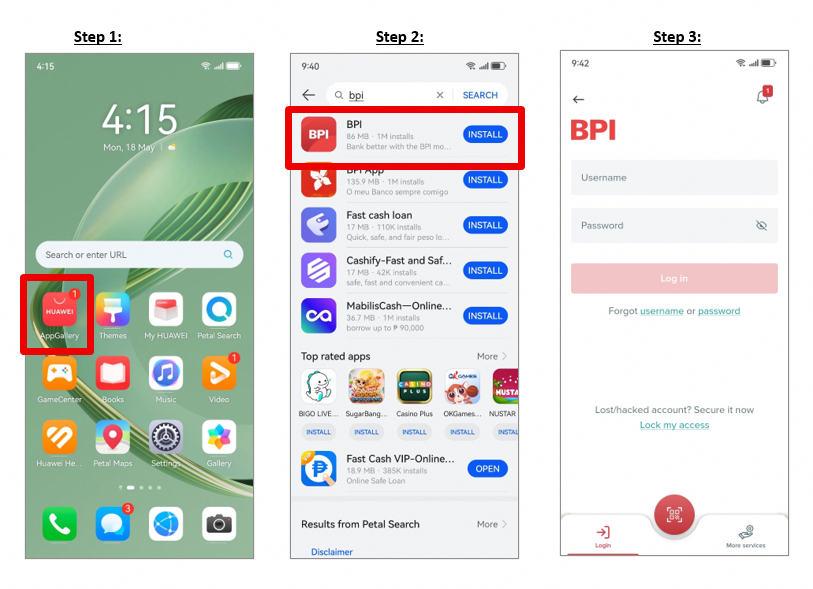
Install or update the app through AppGallery before departure. The Huawei Community guide for huawei bpi provides the basic download path. Log in while you still have reliable access to your BPI-registered SIM and confirm that Mobile Key works.
Keep the registered number active and able to receive SMS while abroad. Check roaming arrangements with your mobile provider and make sure the SIM has enough balance to send a registration message if the app needs to verify a new device. Set the phone’s date and time to automatic so security checks reflect your current location.
Use the App Safely Overseas
Choose mobile data or a trusted private Wi-Fi network for banking. Avoid registering a device, changing a password, or approving a transaction on open airport or café Wi-Fi. Never follow a login link from an unexpected text, email, or social-media message; open the installed app directly.
A secure Huawei BPI routine also includes checking the amount and recipient before approving a transfer. Treat every OTP and Mobile Key request as a separate transaction. If a prompt appears when you are not banking, reject it and review recent activity.
Fix Missing OTPs and Registration Messages
If an OTP does not arrive, check the signal, SMS inbox, and spam folder. Delete old messages if storage is full, turn Airplane mode on and off, and restart the phone. Confirm that the correct SIM is active for calls and texts.
For Secure SMS problems, make sure the registered SIM can send a message and that the BPI app has the required SMS permission. Do not switch apps during registration. If you changed your mobile number, use BPI’s official number-change process rather than entering a temporary overseas number without checking eligibility.
Handle Security or Login Errors Carefully
If the app reports that device security is compromised, update the BPI app first. Confirm that the phone is not rooted, Developer Options are off, and no screen-overlay, call-recording, or security app is interfering with the banking session.
Do not permanently disable accessibility or security features you rely on simply to force the app to open. Test one change at a time, restore important settings afterward, and contact BPI through an official channel if the message continues. If a walkthrough screen is difficult to use, returning display size and font scaling closer to standard may help.
Changing or Reinstalling the App
Clearing the cache is safer than immediately deleting app data. Reinstallation removes the local setup and may require device registration again. Before reinstalling, confirm that you know your credentials and can access the registered SIM.
Use the huawei bpi page as the Huawei installation baseline. Then work through network, SIM, time, permissions, updates, and device security in order. This reduces unnecessary changes and protects access when you are far from a branch.